SEO Management
Managing your search profile and reputation is more important than ever for better SEO.
Professional management for complete online search presence.
We analyze and manage your Google Search Console, Google Analytics, and Google My Business Accounts to ensure we optimize your website for best search results. We will raise your Domain authority, fix broken links, forward 404 pages, add internal & external links. We do what it takes to get your website real search engine results for better SEO.
We utilize SEM Rush for all our Managed SEO clients. We provide you will a full license to use SEM Rush yourself while providing added value by setting up and managing your monthly recommendations. SEM Rush is a A $139 monthly value.
SEO Managed
$750
per month
Get professional SEO every month!
2 Hours of Monthly Optimization
SEM Rush Account
Up to 5 Pages/Search Terms
Competitor Search Tracking
Monthly Customer Reports
Google Search Console Management
Google Analytics Management
SEO Managed + Local
$950
per month
Includes Google Local Listing
2 Hours of Monthly Optimization
SEM Rush Account +Local
Up to 5 Pages/Search Terms
Competitor Search Tracking
Monthly Customer Reports
Google Search Console Management
Google Analytics Management
Google My Business Management
AI Based Google Review Responses
Local+ Listing Submittal & Management
+ Local
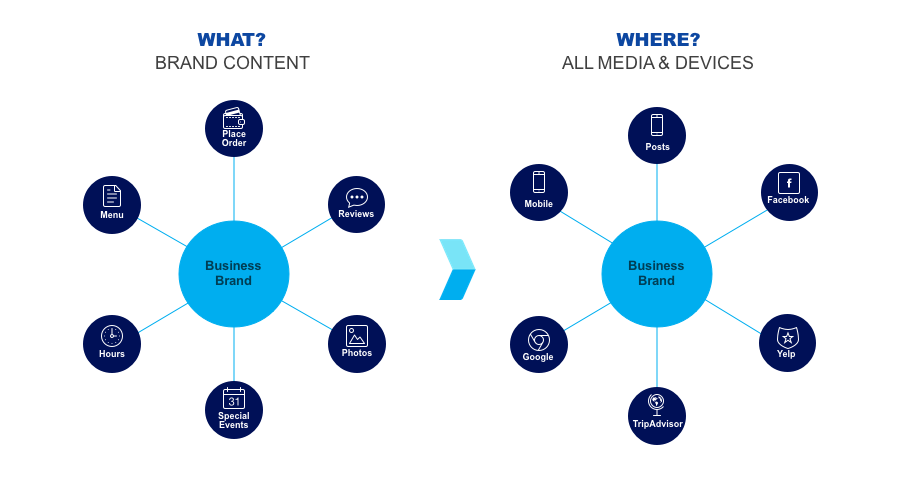
Our tech team constantly looks after your business online profile and reputation!
How we do it!
ClackaNET.com – WordPress Website Management & Hosting: Standard Practices
1. Hosting & Server Infrastructure
- Reliable hosting platforms
- Managed WordPress hosting with strong uptime, fast performance, and proactive support.
- Managed WordPress hosting with strong uptime, fast performance, and proactive support.
- Web Application Firewall (WAF)
- Implement a DNS based WAF (e.g., Cloudflare,i) to filter malicious traffic, prevent common attacks (SQL injection, XSS), and mitigate DDoS.
- Implement a Secondary WAF on-server using IP-less routing.
- Server security & maintenance
- Keep the operating system and server software (e.g., PHP, MySQL) consistently patched.
- Use SSH keys and disable root login.
- Enforce strong password/encryption policies for admin access including 2 factor authentication.
- Monitoring & downtime detection
- Server based uptime monitoring to detect outages. Based on Ping, DNS resolution and snapshots comparison of homepage.
- Real people working 24/7/365 to proactively fix issues and restore service interruptions.
- 3rd party monitoring through Better Stack for secondary detection.
- Integrate AI-based alerting to differentiate between critical failures and temporary glitches.
- Reporting of downtime sent via email weekly.
2. WordPress Core, Theme, and Plugin Updates
- Staging/testing environment
- Always test updates in a staging environment first.
- Always test updates in a staging environment first.
- AI-based update validation
- Employ tools that use AI to assess plugin/theme update compatibility and security risks before rolling out (e.g., AI-driven dependency checkers).
- Employ tools that use AI to assess plugin/theme update compatibility and security risks before rolling out (e.g., AI-driven dependency checkers).
- Change logs & rollback strategies
- Log all updates and allow safe rollback if any issues arise.
- Keep versioned backups to aid troubleshooting.
3. Backups: Local & Cloud
- On-server backups
- Set up daily scheduled backups of the site files and database on the server.
- Set up daily scheduled backups of the site files and database on the server.
- Cloud backups
- Store offsite backups via AWS S3, or Google Cloud Storage.
- Retain multiple restore points, including old versions. Also access to Internet Archives Time Machine.
- Backup verification
- Regularly test restore workflows to ensure backups are valid and functional.
4. Performance & Security Monitoring
- Real-time uptime and performance tracking
- Use uptime monitoring tools to detect downtime.
- Monitor page speed and performance metrics (e.g., TTFB, First Contentful Paint).
- Security scanning
- Schedule regular malware scans and vulnerability assessments.
- Utilize AI to flag suspicious behavior or known security threats.
5. Analytics, SEO & Reporting
- Google Analytics & Search Console integration
- Monitor traffic, user behavior, and search performance.
- Track Core Web Vitals, indexing status, and crawl errors.
- SEO tools: SEMrush & Keyword Analyzer
- Run regular keyword ranking reports and track competitor performance with SEMrush.
- Use keyword analyzer tools for on-page optimization and content planning.
- Heatmaps & A/B Testing
- Deploy Hotjar as needed to record visitor behavior via heatmaps.
- Perform A/B testing on headlines, CTAs, and page layouts to improve conversion rates.
- Aggregated reporting dashboard
- Create visually-rich, automated dashboards combining Analytics, Search Console, SEO, and Performance.
- Generate monthly PDF or interactive reports for stakeholders.
6. Usability & Conversion Optimization
- Behavioral monitoring
- Use scroll maps, click maps, and session recordings to identify usability issues.
- Use scroll maps, click maps, and session recordings to identify usability issues.
- Iterative A/B experiments
- Run continuous A/B tests for titles, landing pages, forms, and CTAs.
- Measure improvements via conversion rates, time-on-site, and bounce rates.
7. Third-Party Integrations
- HubSpot, Highlevel, SalesForce or Monday.com integration for forms & CRM
- Embed forms directly into WordPress for lead capture.
- Ensure auto-sync of leads into CRM with tagging and segmentation.
- Email List sign-up forms with logic based user interface.
- Google Business Listing & AI-powered Review Management
- Manage Google My Business listing details and ensure NAP consistency.
- Use AI-based tools to craft timely and polite responses to reviews, improving local SEO and reputation.
- Linkage & Automation
- Use Zapier or native integrations to connect WordPress form submissions with CRM, email marketing, support workflows, etc.
8. Ongoing Oversight & Quality Assurance
- Automated safety checks
- Run AI-based diagnostics prior to updates to predict breakage or conflicts.
- Run AI-based diagnostics prior to updates to predict breakage or conflicts.
- Maintenance calendar
- Schedule regular maintenance windows for server updates, backups, and security audits.
- Schedule regular maintenance windows for server updates, backups, and security audits.
- User feedback channels
- Implement feedback widgets or short surveys to capture visitor input for usability improvements.
- Implement feedback widgets or short surveys to capture visitor input for usability improvements.
- Accessibility and compliance scanning
- Scan for ADA and WCAG compliance, mitigating accessibility issues.
- Scan for ADA and WCAG compliance, mitigating accessibility issues.
Summary: ClackaNET.com Approach
ClackaNET.com’s WordPress management philosophy emphasizes:
- Robust security layers, including WAF, AI-guided vulnerability assessment, and proactive patching.
- Stability and resilience through structured staging, backups (server + cloud), and restore testing.
- Data-informed performance improvement backed by heatmaps, A/B testing, and analytic tools (Analytics, Search Console, SEMrush).
- Seamless integration with vital tools: HubSpot CRM, Google Business optimizations, and intelligent automation.
Continuous oversight, powered by AI tools for update risk evaluation, uptime monitoring, and review management.